
Callbook
from download to your own ledger app.
Callbook is an Android and iOS app that keeps receipts of market calls and checks them later against public prices. This guide takes you from the download to a branded build in the stores, step by step. Read it top to bottom the first time; after that, press / and search.
AI disclosure: AI tools were used to assist with parts of the code, documentation and graphics of this item. The author reviewed and tested the result. The product itself contains no AI features.
01What you bought
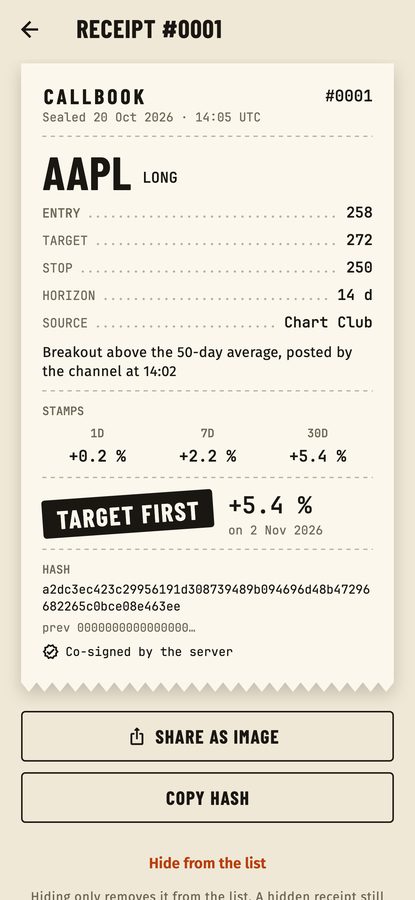
Callbook is a complete, white-label mobile app source code plus an optional small server. A person logs a call they saw (asset, direction, entry, target, stop, horizon and where it came from). The app seals it as a numbered receipt in a SHA-256 hash chain, so it cannot be edited or deleted. If you run the server, it also co-signs the receipt hash with a fixed first-seen time. Later the app scores the call against public daily prices at 1, 7 and 30 days, decides whether the target or the stop was touched first, and gives each source an honest record with a 95 % Wilson interval. No share is shown for a source until it has at least 10 resolved calls.
It works for stocks and ETFs first (examples in these docs use AAPL, NVDA and SPY), for crypto, and for custom assets that the user settles by hand.
Callbook is a record-keeping and accountability tool. It gives no advice, shows no buy or sell prompts and makes no predictions. Please describe your app the same way in your store listing.
| Part | Folder | What it is |
|---|---|---|
| Mobile app | app/ | Flutter project for Android and iOS. Works with no server: receipts are sealed on the device only and prices cannot be fetched. |
| Server (optional) | server/ | Node.js backend with an operator console: co-signs receipt hashes, caches public prices, and lets you change the paywall limits, features, price providers, announcements and force update without a new build; optionally confirms purchases with the stores. |
| Contract | contract/CONTRACT.md | The API between app and server, the hash chain format and the scoring rules, with example JSON. |
02Folder map
| Path | What is inside |
|---|---|
app/lib/brand.dart | App name, tagline, accent colour, fonts, support/privacy/terms links, default store product ids and the server address. The one file for rebranding. |
app/lib/src/core/ | The rules in plain Dart: chain.dart (seal and check), cosign.dart (verify the server signature), scoring.dart (target or stop first, stamps, Wilson interval), gate.dart (basic-tier limits), csv.dart, config.dart. |
app/lib/src/ other folders | data/ (SQLite store), services/ (controller, config client, market API, purchases, ping, settings), ui/screens/ (Ledger, Log a call, Receipt, Sources, Settings, Rules, Paywall, Onboarding, Update). |
app/android/, app/ios/ | Android and iOS projects. The iOS project includes PrivacyInfo.xcprivacy. |
app/assets/fonts/ | Barlow Condensed, Fira Sans and JetBrains Mono with their licence texts. |
app/tool/make_icon.py | Script that draws the app icon. |
server/src/ | TypeScript server: app.ts (routes), cosign.ts, prices.ts, assets.ts, providers/ (Binance, CoinGecko, Twelve Data), purchases/ (App Store and Google Play checks), admin/manifest.ts (what the console shows). |
server/packages/admin-kit/ | The operator console, licensed with this item. |
server/.env.example | Every server setting, with comments. |
server/Dockerfile | Container build for the server (not run by the author). |
03How it fits together
The app works alone. The server is optional. Arrows point from the part that calls to the part that answers.
04Quick start (about 25 minutes)
Flutter runs natively on Windows: use PowerShell for the flutter commands and Android builds (iOS builds need a Mac). For the server, either install Node.js 22.12+ for Windows and use PowerShell (replace cp .env.example .env with Copy-Item .env.example .env; there is no openssl by default, so use WSL or any random 64-character hex string), or run the commands in WSL 2 (Ubuntu) or Docker. npm run keygen is plain Node and works the same in PowerShell. macOS and Linux users can ignore this note.
- Install Flutter 3.41 or newer and Node.js 22.12 or newer (see Requirements). Run
flutter doctoruntil it shows no red items for the platform you want. - Start the server (optional, but needed for co-signing and prices). Details on Installation.
cd server cp .env.example .env npm ci npm run build npm start - Create the signing key and open
http://localhost:8787/admin: Signing. - Run the app:
cd app flutter pub get flutter run --dart-define=API_BASE_URL=https://your-server.example - Rebrand: Rename and rebrand.
- Create the store products: Store products.
- Build and publish: Release builds and signing.
A read-only demo of the operator console at https://callbook-demo.mikodes.com/admin · Email: demo@callbook.demo · Password: callbook-demo-2026 (read-only demo account). A demo APK (arm64, debug-signed) is at https://callbook-demo.mikodes.com/download/callbook-demo.apk. The demo server has a signing key saved, Binance on and Twelve Data off, so the demo app offers crypto assets only.